 TrueRoute
Reading the Diagnostics Screen
The diagnostics screen shows real-time sensor data, EKF fusion state, and GPS disruption detection scores. Use it to verify system health before a drive or to investigate positioning issues.
What you need
- TrueRoute running on your Android device.
- For full diagnostics: an ELM327 Bluetooth OBD2 adapter connected to your vehicle. See How to Connect an OBD2 Adapter.
Steps
- Open TrueRoute and tap the Diagnostics icon in the main menu.
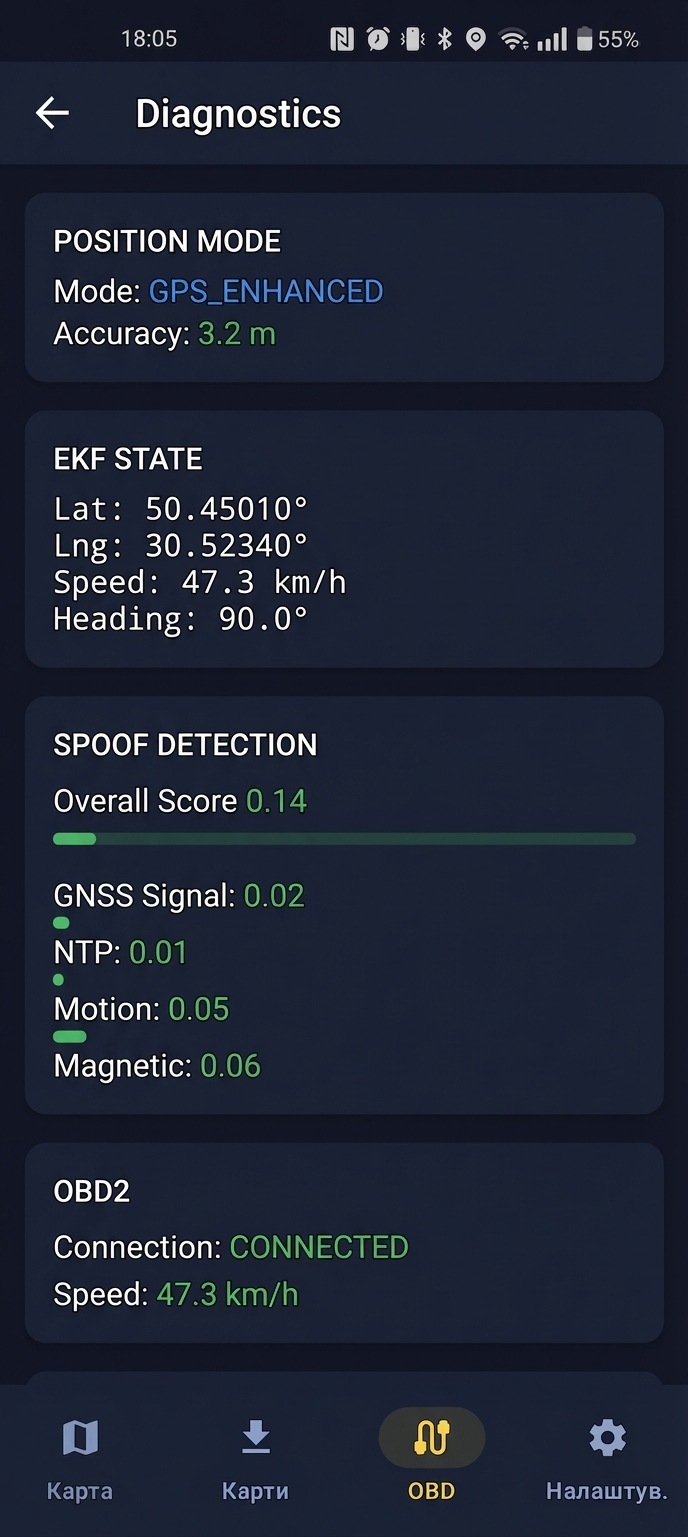
- Review each sensor group. The screen updates in real time as sensors report new data.
Sensor values explained
GPS position and accuracy
- GPS position (lat/lng): Your phone's raw GPS coordinates.
- Accuracy radius (meters): The estimated accuracy of the GPS fix. Lower values mean better accuracy.
OBD2 data
- OBD2 speed (km/h): Vehicle speed read from the OBD2 adapter. Shows
--when no adapter is connected. - RPM: Engine revolutions per minute. Useful for confirming the adapter is reading live data.
Phone sensors
- Gyroscope yaw rate (degrees/second): The rate of rotation around the vertical axis. Used for heading estimation in Dead Reckoning mode.
- Compass heading (degrees): Magnetic heading where 0 = North, 90 = East, 180 = South, 270 = West.
EKF fused position
- EKF position (lat/lng): The fused position calculated by the Extended Kalman Filter, combining GPS, OBD2, and gyroscope data. This is the position shown on the map in Enhanced and Dead Reckoning modes.
Spoof detection
- Spoof confidence score (0.0–1.0): The overall likelihood that GPS is being disrupted. Key thresholds: 0.6 triggers a warning, 0.8 triggers Dead Reckoning mode.
- Per-detector sub-scores:
- Position jump (weight: 35%): Detects sudden GPS position jumps inconsistent with vehicle speed.
- Speed mismatch (weight: 30%): Compares GPS-derived speed against OBD2 speed.
- Heading mismatch (weight: 20%): Compares GPS heading against gyroscope heading.
- GNSS anomaly (weight: 15%): Detects unusual satellite signal patterns.
Verifying system health before a drive
-
Open the diagnostics screen with the vehicle running and the OBD2 adapter connected.
-
Confirm OBD2 speed shows a value (not
--). If it shows--, the adapter is not connected. See How to Connect an OBD2 Adapter. -
Confirm GPS accuracy is below 20 meters. Higher values indicate poor GPS signal.
-
Confirm the spoof confidence score is below 0.3. A score above 0.6 before you start driving may indicate an issue with your location.
-
Confirm the EKF position matches your actual location on the map.